The Brain
One component per character, and everything else runs through it. What it holds, what it coordinates, and what each section of its inspector is for.
The brain does not form shapes and does not decide what the face looks like. It coordinates: it owns the clock the whole face runs on, keeps FaceCue and your animation out of each other's way, holds the facts every driver needs to agree on, and takes in what your game knows.
This page follows the order the inspector draws, so you can read it beside the component.
Speech Mode Detection
How the character works out whether it is Talking, Listening or Idle.
Left alone it decides from its own audio: a clip above the amplitude threshold means Talking. Wire up the conversation interface and it takes the answer from your game instead, which is the only way it can know it is Listening, because nothing is playing when it is. Covered in Speaking and Listening.
Facial Timestep
The clock. How often the simulation advances, how often it reaches the rig, and the smoothing between the two.
This is the single most consequential setting on the component and it has a page of its own: One Clock.
Animator Coexistence
Where FaceCue sits relative to Unity's animator.
FaceCue runs its decisions before the animator and writes the face after it, so authored animation and the facial performance compose instead of overwriting each other. This section is where that relationship is set, and where you say who owns a bone when both could claim it.
It matters most on characters with hand-authored head motion. Get it wrong and either your animation is ignored or the face is, and both look like a broken driver rather than a settings problem.
What to expect from it, and what each control here does, is set out in Working With Your Animation.
Drivers
A readout, not a setting. It lists which drivers are on the character and what each one is missing.
Worth looking at first when something is not behaving, because a driver with nothing to drive says so here instead of failing quietly at play time.
Behavior and World Inputs
What your game tells the character, and what the character currently believes.
World Inputs are the five things FaceCue cannot work out for itself: what the character is looking at, whether it is being spoken to, how hard it is working, how bright the scene is, and whether it is producing speech. Your game supplies them, and each one is owned by whatever set it so it can be cleaned up when that goes away. Set out in World Inputs.
The state readouts below them, Gaze State, Mental State, Conversant State, are live values. They are the fastest way to tell whether a character is behaving oddly because it is in a state you did not expect.
Setup: Core References
The facts every driver resolves against, worked out once at setup and correctable by hand.
| Reference | What it decides |
|---|---|
| Character Root | Where FaceCue searches from |
| Character Up | Which way the character faces, so "left" means something |
| Head Bone | Where a look starts from, and what the neck chain hangs off |
| Gaze Chain | Which bones a look is distributed across |
| Breath Bones | What a breath moves |
| Hand Chains | Which limbs get compensated when the body turns to look |
A Wrong Frame Looks Like a Broken Driver
A character whose Character Up is resolved wrongly looks in the wrong direction while behaving perfectly correctly. Nothing errors and nothing warns, and the symptom points at gaze rather than at the reference underneath it.
If a character looks consistently wrong by a fixed amount, check here before tuning anything.
Blendshape Census
A scan, run from this section, that records which blendshapes actually displace geometry.
It exists because of how the big character pipelines export. A prepared Daz or Character Creator figure often carries the entire blendshape set on every renderer, so a mouth shape exists on the boots as well as on the face, and most of those copies move nothing at all. Driving them costs time and achieves nothing.
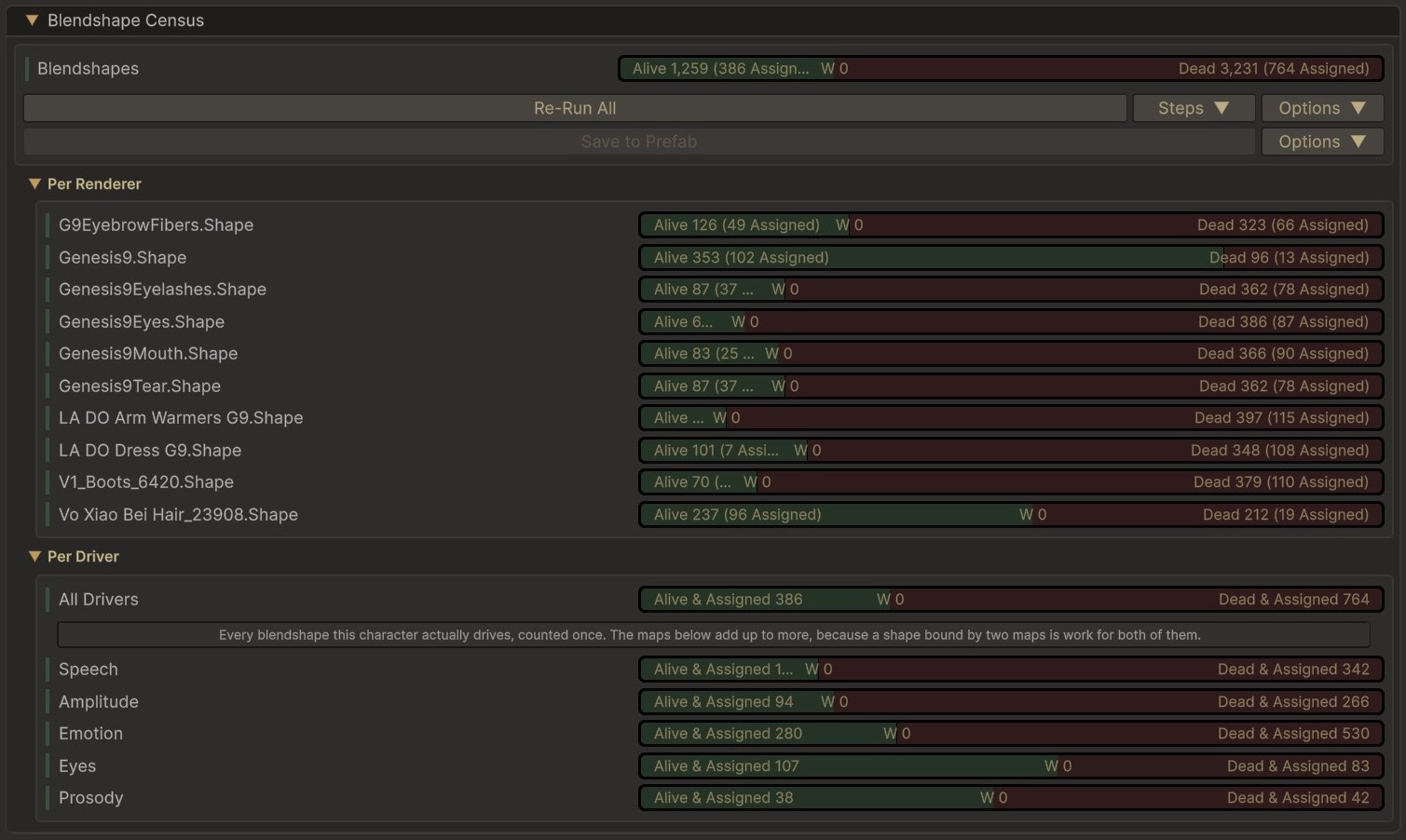
The bars read three ways. Alive shapes move geometry. Dead ones move nothing. The narrow band between them, marked W, is shapes that move something but less than the character's tolerance, which are treated as dead for driving and shown separately so you can see what the tolerance is costing.
The census answers that once. It records two different things on purpose:
- Aliveness is keyed to the mesh, because whether a shape moves geometry is a fact about the geometry. Two renderers sharing a mesh share the answer.
- Coverage is keyed to the renderer, and is a report for you. Nothing at runtime reads it.
Nothing consults the census while the face is being driven. The filter runs once, when a rig map resolves, and the per-frame work never sees the pairs it dropped.
It is worth re-running after you change the rig, but a stale census cannot break a character, because every way it could go wrong fails towards driving the shape.
- An unmeasured shape is driven. Unknown is treated as alive everywhere, so anything the census has no answer for behaves as though the census had never run.
- A changed mesh reads as unknown, not as dead. A mesh re-imported in place keeps its reference, so the old record would otherwise be consulted for shapes it never measured. FaceCue compares the shape and vertex counts first and gives up rather than guessing.
- A rescan replaces, never merges. A half-updated record would be the dangerous kind, because after the fact there is no telling the stale half from the fresh one.
- Reassigning the character root discards the census, since it now describes a different rig.
So the cost of a stale census is lost optimisation, not a broken face. What it found is read further down, per renderer, under Renderer Groups.
Renderer Groups
Which meshes each driver writes to.
The groups themselves are defined on the character's rig map, along with which renderers belong to each. That is where a face is divided up: head, eyes, teeth, tongue, and whatever else a particular character carries.
The second half happens on each driver's own inspector. Every driver carries a Renderer Groups section listing the map's groups, and a Driven By toggle per group, so you set the character's meshes up once on the map and then decide, driver by driver, which of them each one moves. It is a filter over an arrangement that already exists, not another place to arrange things.
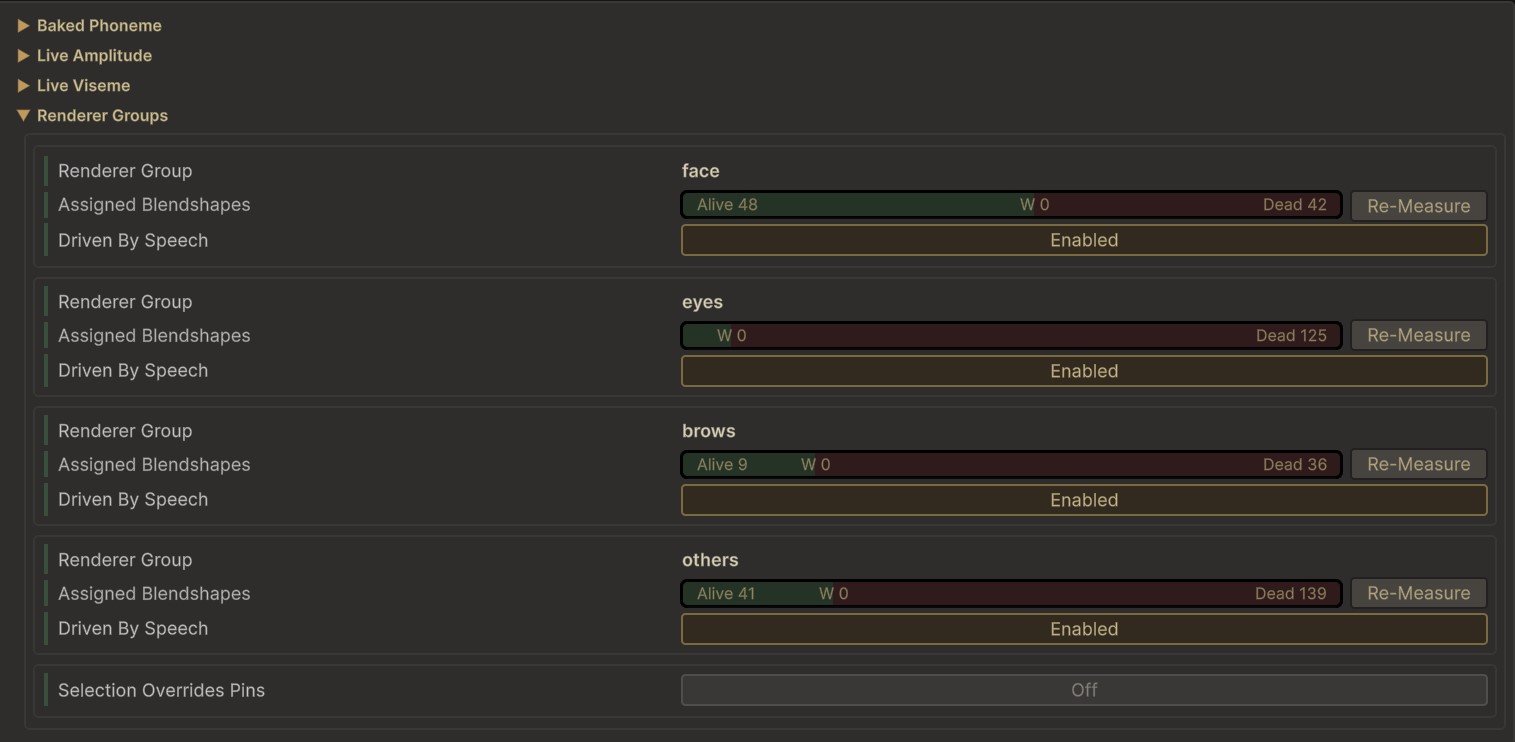
Each group also shows its own slice of the census, alive against dead for the shapes assigned on those meshes, with a Re-Measure for just that group. A group with no matching renderers on this character says so in place.
That is more useful than it sounds. It is how you keep the speech driver off a mesh it should not touch while emotion still uses it, without either of them needing a rig map of its own.
You Cannot Lose a Mesh by Forgetting One
A map can carry a catch-all group that admits every renderer no other group claims. It is there so the grouping is a clean partition, with each renderer landing in exactly one group.
The practical effect is that a mesh you never assigned still resolves. What you lose is the choice: it arrives in the catch-all rather than in a group you can point a driver at, so the fix is to go back to the map and give it one.
Reading the Census Per Renderer
The census results are inspectable here, renderer by renderer, so you can see what was found on each mesh instead of taking the summary on trust.
The section also says when it has nothing to tell you. It reports a character that has never been scanned, and one whose renderers have changed since the last scan, so a census that no longer matches the character says so rather than looking current.